We start with a free scoping visit. We take the Access system apart, write down what it really does and how staff really use it, and give you a written proposal with a fixed price. Then we build the replacement in weekly demos on a live test system, migrate the data, run training on the install day and support it afterwards.
Two of our products started this way. Ferrystone replaced five Access databases, 102 online forms and 26 workflows at a patient transport operator with 200 staff. Milkware replaced a 1990s round program at a dairy with 3,000 customers. If your business is a dairy or a transport operator, one of those may fit you out of the box. If not, we build to fit.
The data is the part people worry about most. We have recovered data from Access files, SQL Server, spreadsheet exports and systems with no export function at all. Migration is part of every replacement, not an add-on, and the first thing we check is that the record count on the new system matches the old one.
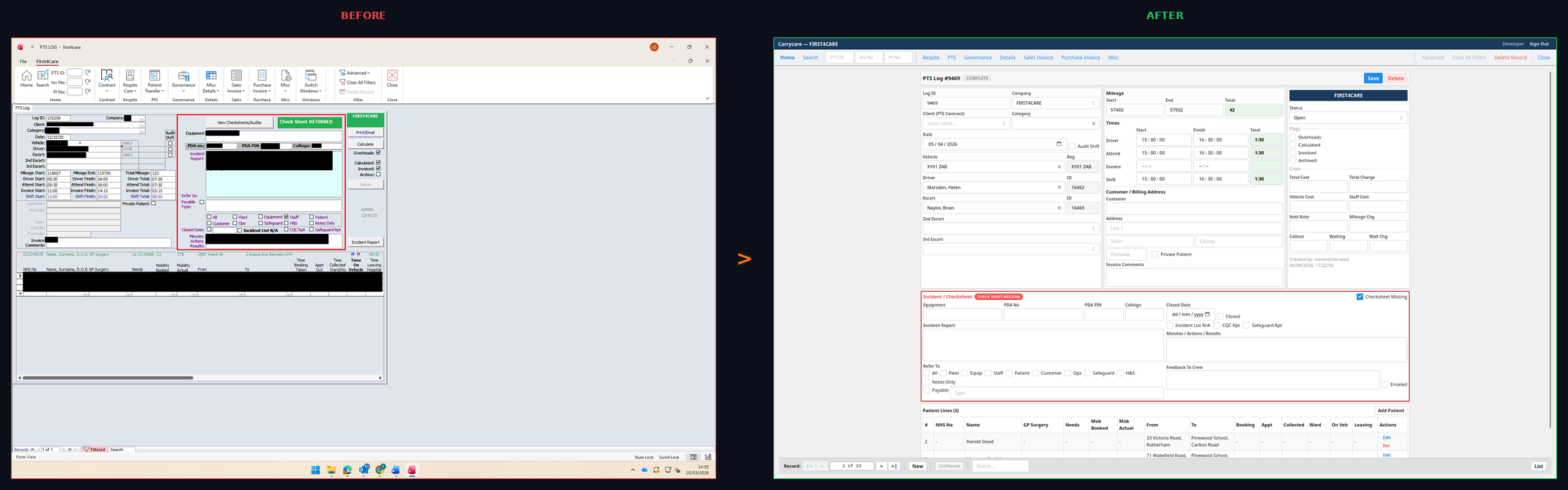
Why businesses come to us
- The one person who understood the database has gone
- Every change is a quote from the old supplier
- Forms and workflows have grown around it in other tools
- Staff cannot use it on a phone or away from the office
- Nobody is sure the data could be got out
What we deliver
- The same system, rebuilt as web software your team uses in a browser
- Every record migrated, including the fields nobody remembers adding
- Forms and workflows brought inside the system
- Staff apps on the phones they already carry
- Changes included on the plan, and a developer you can ring